

Approval Tests: An Alternative View on Test Automation

Join the DZone community and get the full member experience.
Join For FreeApproval Tests or simply Approvals is a framework created by Llewellyn Falco and Dan Gilkerson,
providing support for .NET, Java, PHP and Ruby. It is not yet another
unit testing framework like NUnit or MbUnit etc.; instead these
frameworks are used to run approval tests.
Broadly speaking, software is nothing more than virtual box there
we put in some inputs and expect some outputs. The outputs could be produce in a zillion ways. Those ways differ by implementation. Unit tests
are too much focused on implementation. That's why unit tests might
fail even if you have working code. Approvals, by contrast, are focused
on output.
How does it work?
Let's take a look at a very simple case. Say, I have a class ShoppingCart. I can add some products inside the shopping cart, and confirm my purchase. I expect that the total price is calculated for me.
[TestFixture]
[UseReporter(typeof(DiffReporter))]
public class ShoppingCartTests {

    [Test]
    public void should_calculate_the_total_price_for_shopping_cart() {
        // do
        var shoppingCart = new ShoppingCart();
        shoppingCart.Add(new Product { Id = "iPad", Price = 500 });
        shoppingCart.Add(new Product { Id = "Mouse", Price = 20 });
        shoppingCart.Confirm();

        // verify
        Approvals.Approve(shoppingCart);
    }
}
What
happens if I run this test? If I'm running it the first time, it fails. No
matter whether it works or doesn't. The framework simply doesn't know that yet. To
understand how correct that code is, use your human power of recognition.
In that case, you'll see that it will open the TortoiseDiff application and show the actual and expected outputs.
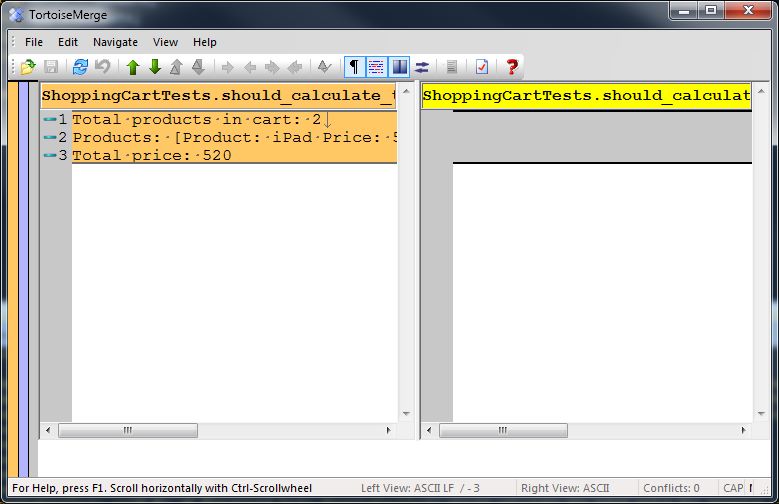
Here, I can tell: "Ok, I have 2 products in my cart..one
iPod and one Mouse, iPods costs 500 smth and mouse is 20 smth.. and the
total price is 520 - looks good! I approve that result!".
Technically, the approving is just copying actual output to
expected. As soon as the test passes, the actual file output is deleted and the
approved file resides near the test code file, so you just check it in
source control.
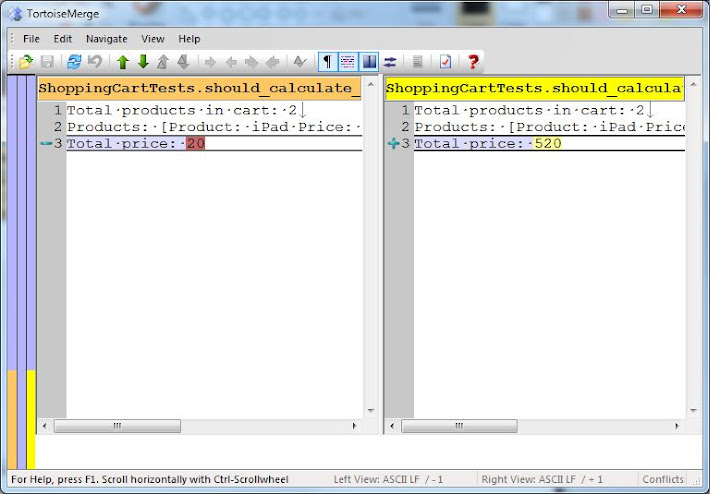
But let's say the shopping cart is modified and something goes wrong.
There would be a failure. In the case of unit tests, that would be multiple
failures of different cases and it might be not so easy to understand exactly
what's wrong. For an approval test, on the other hand, it would be just one failure. And
the cooles thing is that can see exactly where the
deviation is.
Where does it work?
It is not only the simple objects that you can
approve. You can even approve different
sources: objects, enumerables, files, HTML, XML etc. On a more high
level: WpfForm, WinForm, ASP.NET Page.
For instance, code for ASP.NET:
[Test]
public void should_have_approved_layout() {
    ApprovalTests.Asp.Approvals.ApproveUrl("http://localhost:62642/customer/");
}
Or for a WPF form:
[Test]
public void should_have_approved_layout() {
    ApprovalTests.Wpf.Approvals.Approve(new Form());
}
With
WPF and Win forms, it's able to serialize them into images, so
the actual and expected results are actually images, so it is easy to
track the differences (TortoiseDiff can do that).
When should you use it?
It works best when you deal with 2 things: UI and legacy code.
Testing UI is always difficult. But what you typically
need to do is: make sure that UI is not changed, and if it has changed, know where exactly the change happened. Approval testing solves that nicely. It takes only one line of code to test ASP.NET page, for instance.
Legacy is another story: you have no tests there at all, but you
have to change code to implement a new feature, or refactor. The
interesting thing about legacy codeis - It works! It works for years, no
matter how it is written (remember, virtual box). And this is a very great
advantage of that code. With approvals, with only one test you can get
all possible outputs (HTML, XLM, JSON, SQL or whatever output it could
be) and approve, because you know - it works! After you have complete such a test
and approved the result, you are really much safer with a refactoring, since
now you "locked down" all existing behavior.
Approvals are not something you need to run all the time, like
units or integration tests. Approval testing is more like handy tool. You create approval
tests, you do your job and at the end of the day it might happen - the tool is no longer needed, so you can just throw the tool away.
Want to hear more?
Just go and listen to this Herding Code podcast episode, or visit the project web site or join me at 17 December on XP Days Ukraine conference in Kiev, where I'm going to have a speech dedicated to Approvals.
Source: http://www.beletsky.net/2011/12/approval-tests-alternative-view-on-test.html
Opinions expressed by DZone contributors are their own.
Comments