

Smart Deployment Strategies for Modern Applications
Docker packages applications to ensure consistent and portable deployments. Kubernetes manages them with scaling, reliability, and automation in production.
Join the DZone community and get the full member experience.
Join For FreeModern application development has moved toward distributed, cloud-based, and even microservices-based applications, requiring scalability, reliability, and performance under different conditions. Therefore, deployment has become a part of application development, not merely a final activity.
Intelligent deployment patterns and practices are all about building applications that are not just easy to deploy, but also reliable, scalable, and efficient in production. This means moving away from traditional, manual deployment patterns and toward automated, container-based deployment practices.
Docker and Kubernetes are two prominent technologies that play a vital role in this transformation and shift toward intelligent deployment patterns and practices. Docker helps developers build applications and deploy them along with their dependencies in lightweight, portable containers, overcoming environment consistency problems, while Kubernetes helps deploy, scale, and self-heal these containers.
However, without an appropriate strategy, it is possible to introduce unnecessary complexity and even performance issues. Not every application needs Kubernetes, nor does every deployment issue call for a distributed solution. Knowing when to use Docker on its own, when to use Kubernetes, and when to balance performance, cost, and complexity is vital to deliver effective modern applications.
This article provides smart deployment strategies using Docker and Kubernetes. It highlights the advantages, disadvantages, and performance of using Docker and Kubernetes. This gives an overview of the deployment strategy.
What Docker Does
Docker packages your application, all dependencies, and the run time into a small container.
Issues Before Docker
- It works on my machine and is inconsistent in different environments, such as development, test, staging, and production
- Dependency conflicts – code language version, missing library version, configuration mismatch
Docker Benefits
- Same behavior everywhere – local development environment, production environment, staging environment, etc.
- Isolation between apps – create each app that has separate containers.
- Fast startup – light weight versus a virtual machine
- Easy deployment – just run the container
Docker start <containername>How Docker Works
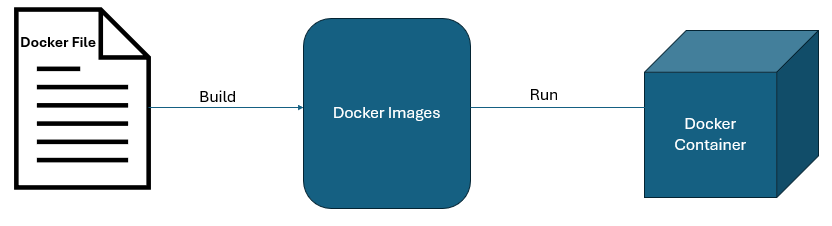
Application Code → Dockerfile → Docker Image → Docker Container → Run applicationA container image can run on a developer laptop, on virtual machines, in a data center, or in cloud environments with the same packaged runtime and dependencies. So that Docker resolves our packaging issues. But what if the machine has 100 containers? What if one crashes? How to scale during high traffic? How to manage deployments?
Docker itself does not solve these problems. Here, we need a deployment strategy; there, we can use Kubernetes.
What Kubernetes Does
The operational problem of managing the image once it has been created is addressed by Kubernetes, which automates the deployment, scaling, and management of containerized applications, and can even maintain the state of the application by replacing failed containers and rescheduling applications as needed.
Kubernetes Benefits
- Auto scaling: More containers (pods) if traffic increases, and fewer containers if traffic decreases.
- Self-healing: Starts the container again if it crashes.
- Load balancing: Spreads the load across the containers.
- Zero downtime deployment: Updates the system without stopping it.
- Service management: Manages multiple microservices easily.
Docker builds and runs the container. Kubernetes runs the container reliably at scale. For example, in a real-world scenario:
- Docker = packing lunch boxes
- Kubernetes = managing a large cafeteria serving thousands
build app → Docker container
               ↓
Deploy many containers → Kubernetes manages them
What a Kubernetes Deployment Actually Does
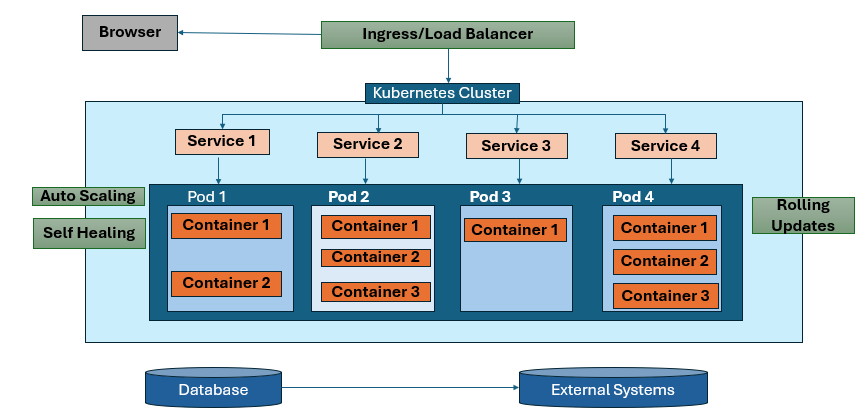
A Kubernetes deployment is a resource in a cluster that manages a group of pods and replica sets for a workload, typically a stateless application. Define the desired state, and the actual state in the cluster moves towards it. Kubernetes also supports rolling updates, where new Pods are created and marked as ready before the old ones are terminated.
The typical process for deploying a Spring Boot application to a Kubernetes cluster
- Develop a Spring Boot application.
- The Spring Boot application is built and packaged as a Docker image.
- The Docker image is pushed to a repository.
- Kubernetes Deployments define the image.
- Kubernetes creates Pods and exposes them via a Service.
Advantages
- Consistent deployments: Docker provides a standard unit for bundling the application and its run-time dependencies. This minimizes environment drift between development, testing, and production environments. This is one of the biggest advantages of using containers for Java-based Spring Boot applications.
- Declarative operations: Kubernetes uses a declarative model to manage its deployments. This is a significant advantage because it makes it easy for organizations to implement automation for the deployment of applications.
- Self-healing: Kubernetes has self-healing features. It can automatically replace failing containers and reschedule the application in case of unavailability. This is a significant advantage because it makes it easy for organizations to implement self-healing for the application.
- Inbuilt scaling options: Kubernetes provides built-in autoscaling features for the application. This makes it easy for organizations to implement elastic and efficient scaling for the application.
- Improved service abstraction and traffic routing: A Kubernetes Service is an API object that defines a single service and provides a consistent endpoint. It is then possible to have the system distribute traffic to matching Pods. If access to the service outside the cluster is required, then Ingress or Gateway-based routing is an option.
- Safer upgrades: It is possible to gradually roll out new versions using rolling updates. This reduces the deployment risk.
Disadvantages
1. More Operational Complexity
While Docker is simple in itself for small applications, Kubernetes introduces additional complexity, such as pods, deployments, services, ingress, ConfigMaps, secrets, autoscaling, networking policies, etc. While these features can be justified for production environments, they are complex features and must be appreciated for their complexity. Kubernetes documentation is divided into so many sections because of the complexity of the platform, which is multi-functional by design, encompassing features like orchestration, networking, scaling, storage, etc.
2. Higher Resource Overhead
Kubernetes introduces operational complexity, which is absent in Docker. This could be a problem for very small applications, as the complexity may outweigh the advantages. This is an assumption based on the complexity of the Kubernetes model compared to the Docker model.
3. Harder Debugging
While debugging a Docker application is relatively simple because the application is hosted on a single host, debugging a distributed application is far more complex because of the involvement of multiple hosts, pods, services, etc. This is an assumption based on the complexity of the Kubernetes model compared to the Docker model.
4. Misconfiguration Risk
Kubernetes is a powerful technology, but misconfiguration can lead to application failures. Network Policies, for example, are complex features by design, requiring production-level configurations.
Performance Considerations
Kubernetes doesn’t make your application run faster on its own. Performance still relies on many factors such as application design, JVM tuning, container image quality, database performance, network latency, and resource allocation. However, there are many operational tools provided by Kubernetes for improving performance under varying loads. These tools include autoscaling and rollout features.
In general terms, performance considerations can be divided into four categories:
- Startup performance. Startup performance of a Spring Boot container can be slow, depending on factors such as application size. However, rollout relies on new Pods becoming available for use. Thus, startup performance can impact rollout performance.
- Runtime efficiency. Containers are much more efficient than traditional deployment models that use many virtual machines. This is why Docker is so popular for container deployment. However, inefficient Docker images or large JVMs can still cause inefficiencies. Docker documentation lists many factors, such as glibc-based or musl-based Docker images.
- Scaling behavior. Horizontal pod autoscaling is useful when load increases, as it adds more pods to handle it, rather than scaling up resources for existing pods. However, it is critical to note that the application should scale horizontally and not have any bottlenecks at the single-node level.
- Networking overhead. Kubernetes provides Services, which add abstraction to the network. Although this is helpful for manageability and load balancing, it is critical to note that there should be careful design for every layer in latency-sensitive applications. The abstraction provided by Services is useful for operational purposes, but is not conceptually.
Limitations
One limitation to be aware of is the fact that Kubernetes deployments are designed for stateless workloads. This means if the application has state tightly coupled with the identity of the instance or has ordered storage, the application may not be the best candidate for a Kubernetes deployment. The Kubernetes documentation itself describes Deployments as typically being used for workloads that “do not maintain state.”
Other practical limitations are:
- Small teams may find Kubernetes too heavy for a simple internal app.
- Stateful systems still require careful storage, backup, and failover planning.
- Local development experience can become more complex than plain Docker Compose.
- Security and networking require active design, not default trust.
When/What to use
| Scenario | Need Docker | Need Kubernetes |
|---|---|---|
|
Run single app |
Yes |
No |
|
Microservices |
Yes |
Yes |
|
Production scale |
Yes |
Yes (Mandatory) |
|
Auto scaling needed |
No |
Yes |
|
High Availability |
No |
Yes |
Conclusion
The modern deployment model is not just about shipping code; it’s about shipping it reliably and at scale. Docker helps in providing consistency across environments, while Kubernetes helps in providing scale, resilience, and automation.
The smart approach in deployment strategy is about selecting the appropriate tool for the job. Docker might be enough for a simple application, but for a complex application with high availability requirements, Kubernetes becomes a must-have.
By understanding the strengths and weaknesses of both tools, we can develop efficient, scalable, and sustainable deployment strategies.
Opinions expressed by DZone contributors are their own.
Comments