

How to Submit a Post to DZone
Find everything you need to post on DZone. Review these guidelines and submit your article for consideration.
Join the DZone community and get the full member experience.
Join For FreeWant to share your knowledge with the DZone community? You’re in the right place. Below is a step-by-step guide to submitting a post.
One quick note before we start: submitting an article doesn’t guarantee it will be published. Every submission goes through moderation to make sure it’s a good fit for the DZone community. Following our Article Submission Guidelines will give your post the best chance of being accepted.
Alright, let’s get into it.
Submitting an Article
Step 1: Sign In (or Sign Up)
Head over to DZone.com and sign in. If you don’t have an account yet, just click Join to create one.
Step 2: Start a New Article
Once you’re signed in, click the plus sign (+) next to your profile picture and choose Post an Article. That’ll open up the article editor.
Step 3: Add Your Content
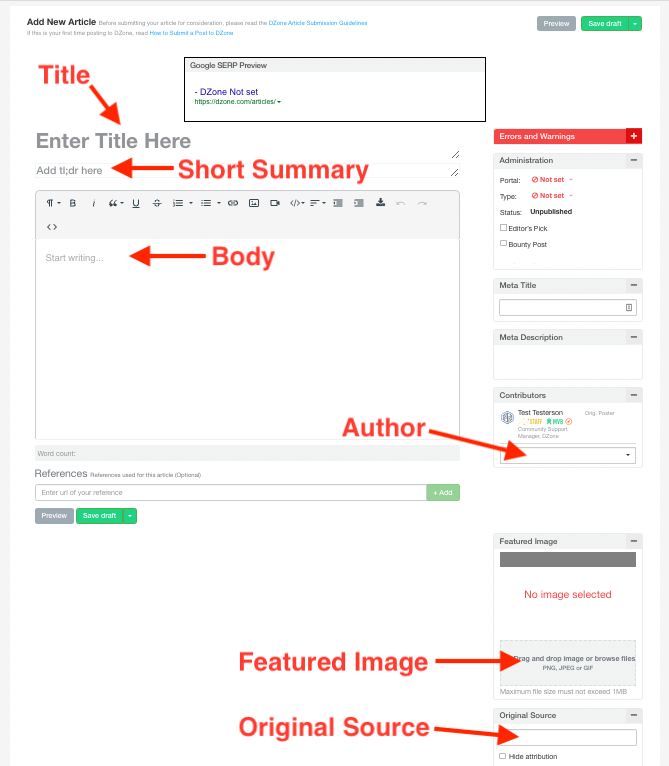
Now it’s time to fill in the details:
- Your title
- A short summary
- The article body
- Author information (Important: posting an article doesn’t automatically make you the author. If you’re the author, remember to tag yourself. If you’re publishing on someone else’s behalf, they’ll need a DZone account so you can credit them properly.)
- Any images and the article source
![A screenshot of the DZone article page that points out the information to fill in, including a title, summary, the body copy, the authorship, and where to add an image and article source.]()
Pro tip: Click Save draft often so you don’t lose your work if you get interrupted.
Step 4: Submit for Review
When everything looks good, click the green arrow next to Save draft and select Submit to Moderation.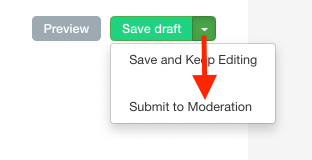
From there, our editorial team will review your article. If it needs a few tweaks, we’ll reach out. If it’s a good fit, we’ll schedule it for publication and you'll be notified once it goes live.
Congratulations! You're officially done.
Editing Your Published Article
Need to make changes after your article is published? No problem.
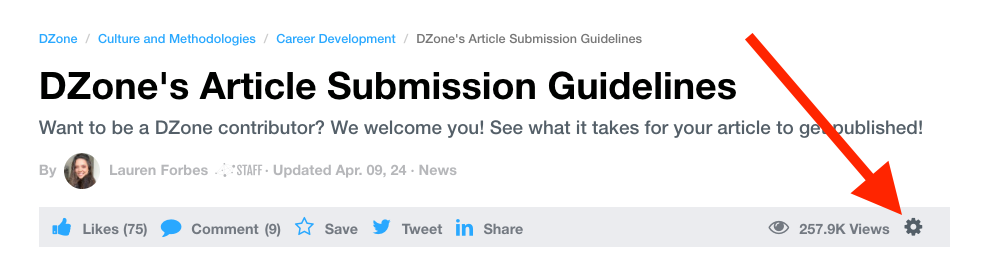
Just click the gear icon next to the pageview count under your article title and select Edit. Make your updates, then click Submit to Moderation again.
Your original article will stay live while we review the changes. Once approved, the updated version will replace it.
Before making edits, be sure to review our Submission Guidelines. If the changes made don’t follow them, we will reject the changes and keep the original version on the site.
Need a Hand?
If you run into any issues or have questions that aren’t covered here, feel free to reach out to us at [email protected]. We’re happy to help.
Thanks for your interest in contributing to DZone!
Opinions expressed by DZone contributors are their own.
Comments